



How to Repair a Database via phpMyAdmin in cPanel
1. Log in to your cPanel account.
2. In the Databases section, click on phpMyAdmin.
3. Click the Expand icon from the navigation tree in the left sidebar.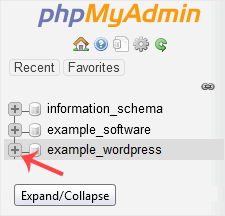
4. Scroll down and mark Check All. Then click on the drop-down arrow and select Repair table.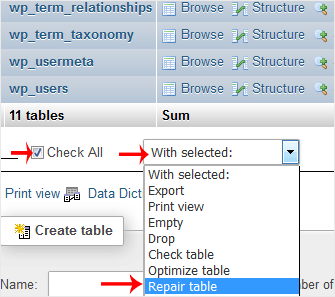
If the table has been repaired successfully, it will show an OK message. Otherwise, it will display an error on some tables.
Was this article helpful?
Discussion
Loading the discussion…
Sign in to join the discussion.